Validating SSL certs in Mobile Apps
Music is blaring, everyone around seems to be grooving to beats and you are having a good time. But is this the actual party you intended to attend? Similar question should be asked, when your mobile app is talking to a server api; even on HTTPS.
I was recently introduced to following talk by Moxie Marlinspike at Defcon. It was fascinating, enlightening and depressing all at the same time.
DEFCON 17: More Tricks For Defeating SSL
Everyone relies on HTTPS over SSL (TLS to be technically correct) to communicate securely to a web server. Traditionally the validation to of SSL certificates served by websites have been done by browsers. A green or a yellow padlock in address bar is good enough to indicate to a user, that s/he is secure and this website is who it claims to be.
While browsers have played a role of being a ubiquitous window to the world of internet, hand held devices and internet connected eye-glasses are defying that tradition.
When you open up your mobile app, how do you know, that you are indeed talking to the right server? How are you certain that someone isn’t snooping on everything that you send over wire to server. (Anyone in addition to NSA that is)
I guess, it is the blatant trust that you have in the app, to do the right thing. And that is the assumption that we need to challenge there. Merely using an SSL/TLS api isn’t good enough. Apps need to be responsible to ensure that are absolutely hundred percent sure of the identity of the server they are talking to.
Lets take a small proof of concept of what someone could do to deceive your apps into thinking they are secure when they are not.
If you familiar with Pocket or formerly known as Read it later; then I hope you have used their apps. I am using their Android app to demonstrate the concept and the flaw I intend to talk about.
What I Intend to do?
I want to run my phone traffic through a proxy and see if I can fool Pocket app into thinking that it is safely talking to the server over https and traffic can’t be intercepted. And subsequently read everything that gets transferred over ssl/tls, including my credentials, in plain text.
What does that prove?
Lets assume that you are in a coffee-shop, and you have a wifi that says “Free Wifi”. Just to humour me, lets say, that wifi is run by a nefarious hacker, who would like you steal your credentials, information and money. Now, if you connect through that wifi endpoint, s/he has the ability to run your traffic through a proxy and conduct, what is called as “Man in the middle attack”. And thats what we are trying to do, proving that app isn’t well safe guarded against that.
What is this “Man in the middle attack”?
Every time you app wants to talk to a server, it agrees with server on a simple “crypto code”. This code is used to garble the text that is being sent. Only server know the “crypto code” and can convert this text back into plain text. So this way, if someone happens to look at the garbled text, then s/he won’t understand it.
Now how does your app agree on this crypto code with server? They do what is called a SSL handshake. Where a server, will show the app a “certificate” that has a name on it. And the app can see the name of the server because server has it’s name on the badge it’s wearing. If they both match then app knows it is indeed “The server”.
If someone comes between you and the server, then when you initiate a SSL handshake, it would give you a fake certificate, that has a name on it, that matches the server name. Lets assume, your app falls for it and agree on a “crypto code”. Then the person will go to server and initiate an SSL handshake with it. So it has a “crypto code with server”. Now the attacker has two “crypto code”, one for you and one for the actual server.
Everything you say, is garbled with the crypto code. However attacker take that, converts it into plain text and then garbles it again and sends it to server. It does the same thing with the things that server says. So now, essentially s/he can read everything and anything that your app and server are talking about; without both of you knowing that he is sitting in between.
This is Man in the middle attack. You ability to know if a certificate that is presented to you is fake or real is deciding factor whether you will fall for the man in the middle or not.
This is an age old problem why are we talking about this again?
Until now, since most of the server interactions happened via browsers, the responsibility to show error if certificate is invalid, stayed with the browser. Since these were built by teams developing against RFC standards, they knew what they were doing. Also, over period of time these implementations became mature and more robust.
Now, mobile applications are individually doing varying level of certificate validations. A lot of them assume that communicating over SSL/TLS is good enough to preserve the data integrity.
Ok Got it! So, how do we test this?
If you would like to reproduce it locally, here is what you can do.
Install MITMPROXY or man in the middle proxy. Installation instructions are here. You may have to install pip package manager to successfully complete the installation. Once the proxy is installed, run following command
mitmproxy -p 8888
This will run the proxy on port 8888. Configure your android phone to use the proxy. Do following steps. These steps are for Android 4.2.1(Jelly Bean), for your version setting a proxy may include a different set of steps. I would recommend googling it up:
Go to Settings > Wifi Long tap on wifi endpoint you are connected to. Select “Modify Network” Check “Show advanced options” Specific IP address of the computer in hostname Specify 8888 as the port number Now validate that browsing to a website in your mobile browser results in an entry in mitmproxy interface. If so, you are all set.
Open pocket app and log out if you were logged in. Now log back in. For sure you will see a POST request in mitmproxy for authentication. This is how it should look:
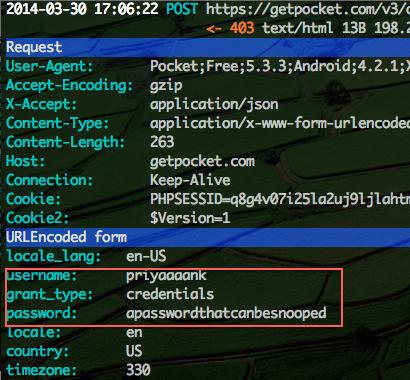
However, as you can see, everything is available in plain text. And so is the response below for the fetch call.
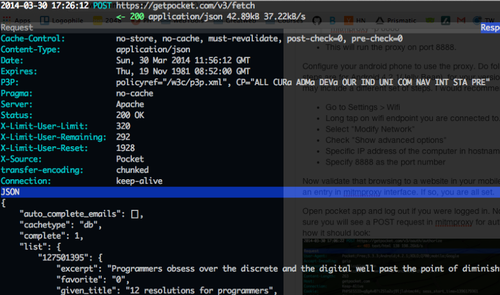
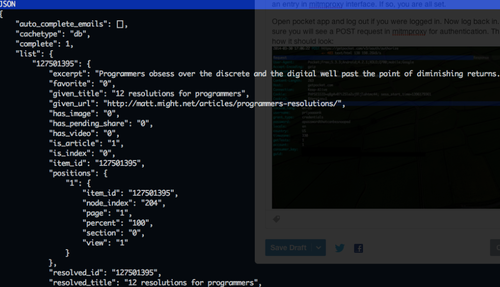
But we didn’t specify a certificate to spoof
Fortunately, mitmproxy implements several clever tricks to spoof certificates. In this case, it would go and get the actual certificate from getPocket’s site. Extract values from that certificate like fqdn name etc. Create a new certificate and sign it with it’s own fake certificate. But since, mitmproxy’s certificate is neither a recognised Root CA’s signing certificate not a certificate that you intend to trust, the SSL handshake should have failed here.
Sometimes, you may need to generate a certificate of your own to serve a specific site and you can do so by following steps:
openssl genrsa -out myown.cert.key 8192
openssl req -new -x509 -key myown.cert.key -out pocketsfake.cert
Specify all values like Company, BU, Country etc, as they appear in real certificate.
cat myown.cert.key pocketsfake.cert > pocketsfake.pem
Once the fake certificate for pocket has been generated, run mitmproxy with following command.
mitmproxy -p 8888 –cert=pocketsfake.pem
Thats it, now you would be serving this certificate to anyone who establishes a connection. In this case, the pocket app.
So why does SSL Handshake proceed when the certificate is not valid?
As part of certificate validation Pocketapp is ensuring that certificate is signed. However the authority that signed the certificate is not a valid one and that’s where the check has been ignored. Here either it should be checked that signing authority is a one I trust even if it is not a widely trusted or known authority (in cases where organisations use self signed certificates). Or ensure that the signing authority is one, that is widely recognised.
However, even in latter case above, some CA (Certificate Authorities) have been compromised when their root certificate was leaked. example DigiNotar. This resulted in valid, however malicious certificates that browsers and such checks couldn’t guard you against it.
In such cases, it has been advised that a technique called “certificate pinning” is used. This is to ascertain that even a valid looking certificate is one that you expect. There are of course several overheads to maintain a certificate pinning, however it does make the apps more secure. A lot more can be read about different techniques of certificate pinning at links below:
Android developer write up on SSL/TLS security
Additional Reading: